
The Hub
Overview
Section titled “Overview”The Matobas Hub is the web command center for your entire operation — Stage 03 of the Matobas pipeline, where everything your floor captures becomes one live, queryable database. Every capture, iteration, and event lands in one place. The Hub organizes reality into three pillars — Inventory (what’s physically available), Actions (what was done), and Blueprints (CAD, SOPs, instructions) — all derived from a single append-only ledger that nothing can silently rewrite. AI agents read that database directly over MCP, and your team queries it in plain language.
Where the Outpost app puts Matobas in a technician’s pocket, the Hub brings every module to the browser: builds, sessions, input devices, timeline, inventory, blueprints, audit, and reviews — one URL for the whole team, with named accounts and per-role access (admin, engineer, operator).
How it works
Section titled “How it works”The Hub sits at the end of a continuous loop that turns physical work into verified digital truth:
- Capture flows in. Iris clip-ons, Oracle cameras, Slack threads, supplier emails, CAD saves, and manual notes all arrive as raw signal — no one stops working to document anything.
- AI drafts a Session. The intelligence layer structures each input into a proposed event: what physically happened, and how it impacts Inventory, Actions, and Blueprints.
- A human approves it. AI never mutates the database. Every Session routes to an engineer for review; only approved events proceed. Zero hallucinations in the permanent record, by design.
- The Timeline commits it. Approved events append to the immutable, time-ordered ledger — the single source of truth for the operation.
- Everything downstream updates. One committed event propagates automatically: inventory deducts, the BOM revises, SOPs update, and integrations like your PLM, ERP, and Slack are notified — from one approval.
The result: blueprints, floor, and inventory can’t silently diverge, and the audit trail assembles itself as a byproduct of people just working.
Modules
Section titled “Modules”Conversational Dashboard
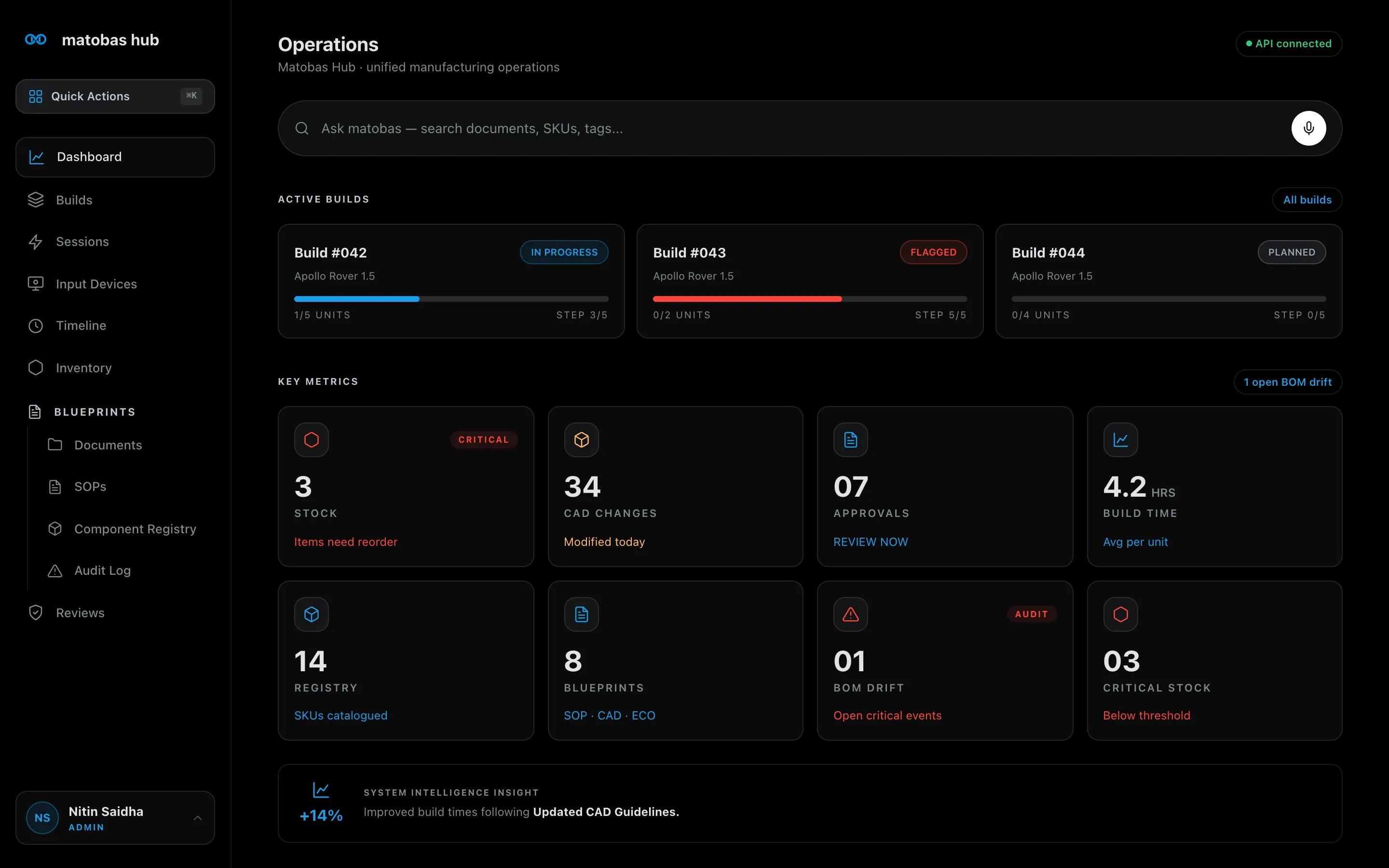
Section titled “Conversational Dashboard”The Operations dashboard is your live picture of the floor: active builds with per-unit and per-step progress, key metrics (critical stock, CAD changes, pending approvals, average build time, open BOM drift), and a System Intelligence Insight that surfaces trends you’d otherwise dig for. At the top sits the AI query bar — ask in plain language (“Show me the assembly video for Robot Arm V2”) and the Hub searches documents, SKUs, tags, and the event log at once.
Quick Actions
Section titled “Quick Actions”Press ⌘K anywhere to open an editable palette of floor operations — start an SOP, check inventory, analyze a build, or launch a voice-controlled recording session — without leaving the screen you’re on. Every capture-and-record action is one gesture away, so it actually gets used mid-task.
Builds
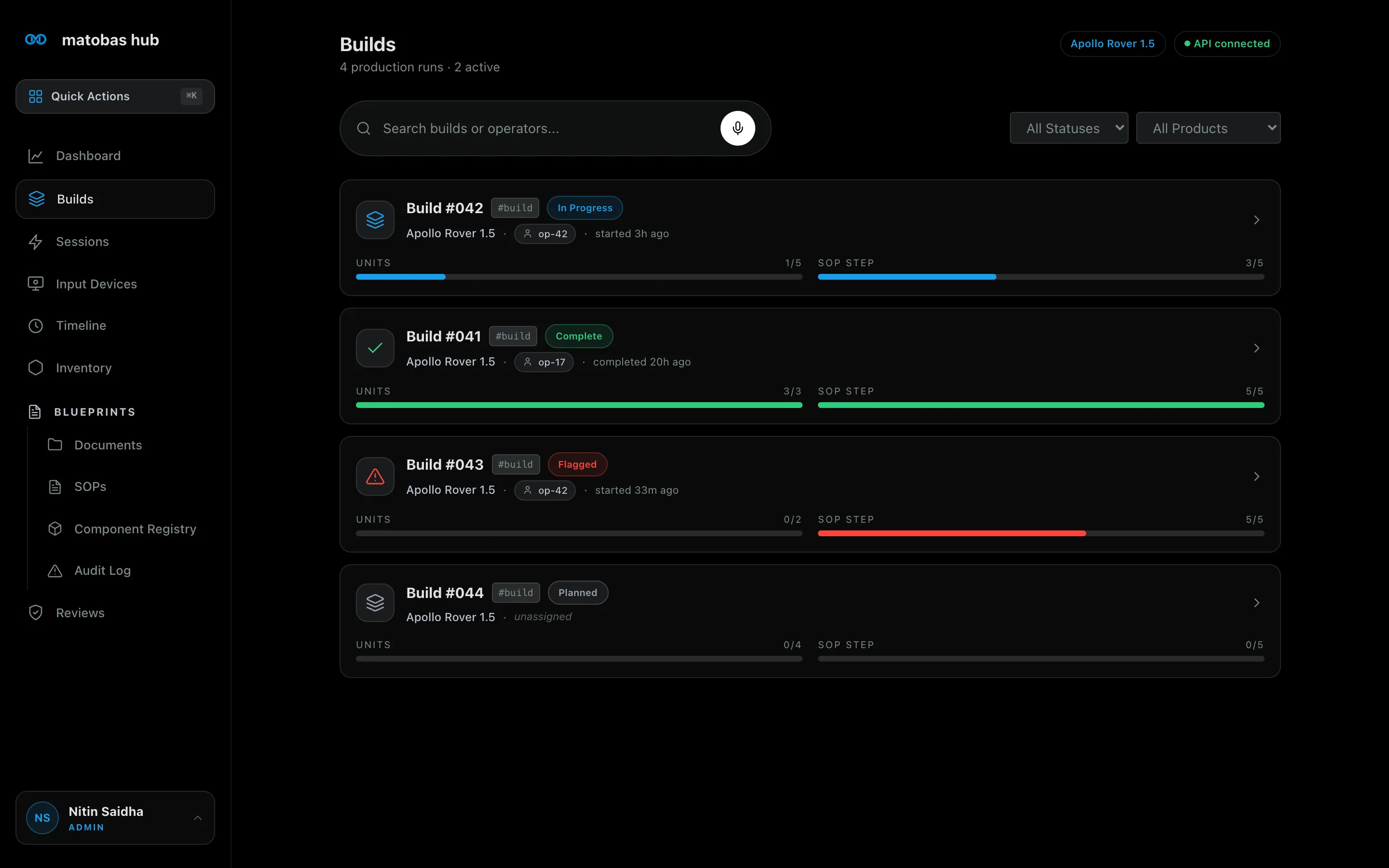
Section titled “Builds”Every production run in one view: status (Planned, In Progress, Flagged, Complete), assigned operator, unit progress, and SOP step progress — searchable by build or operator and filterable by status and product. A flagged build means the drift engine caught something — the wrong part picked, a skipped step — and paused work before it became rework.
Open any run and the build detail shows each assembly step with the exact SKU it expects, live part verification, and the run’s eBOM — required versus in-stock quantities for every part, with shortfalls highlighted before they stop the line. Every build can be compared against its blueprint in one click, and drift or anomaly events attach directly to the run.
Sessions
Section titled “Sessions”One inbox for every input stream — recorded walkthroughs, Slack threads, supplier emails, manual field notes — each carrying the AI’s inference for you to review, edit, approve, or reject. Filter to your own sessions or the whole team’s. The human gate scales; nothing captured anywhere falls through the cracks waiting for review.
Live Tech Support (Voice AI)
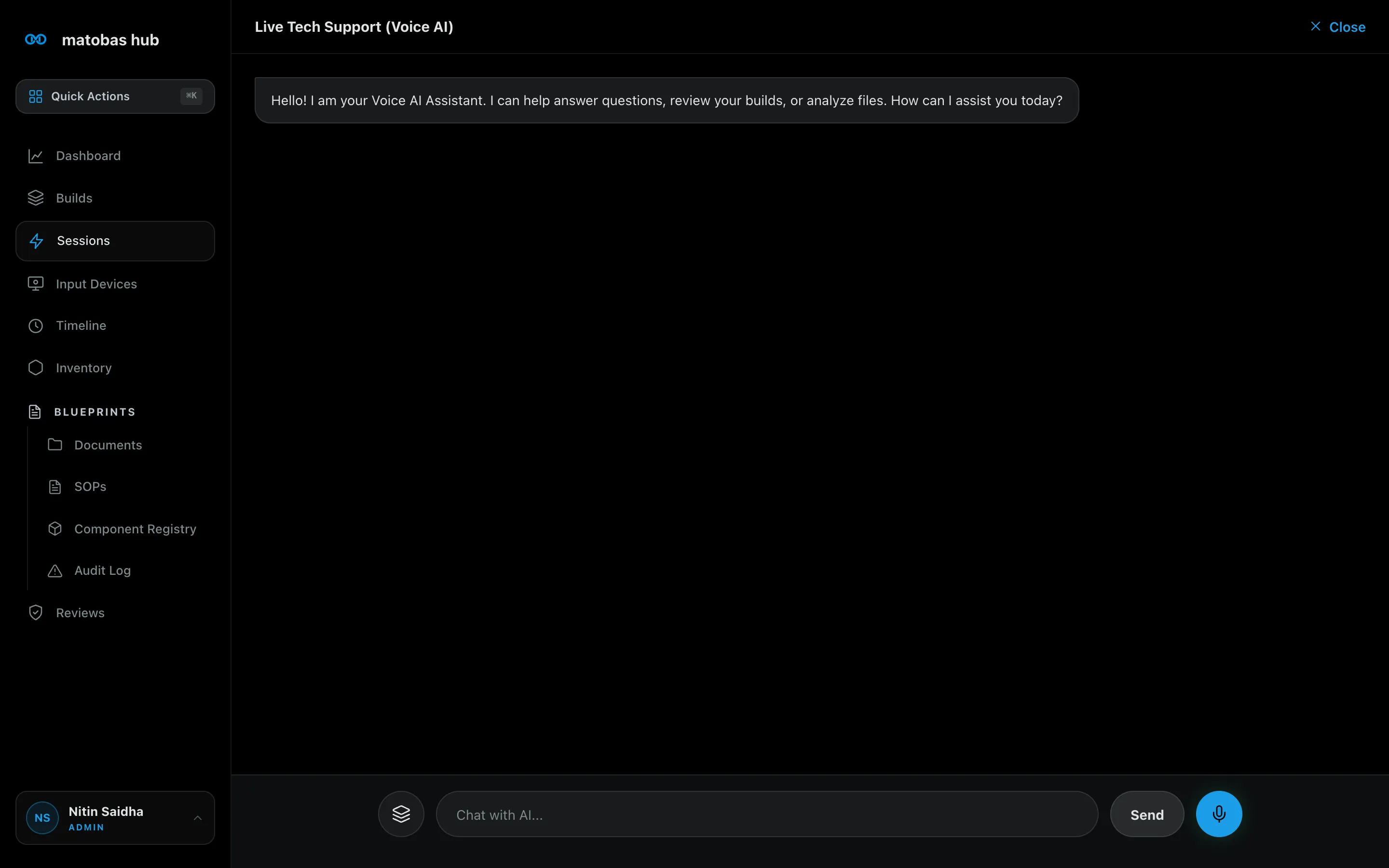
Section titled “Live Tech Support (Voice AI)”A conversational AI assistant, one click from any build or session. Chat by text or talk by voice: ask it questions about the operation, have it review a build in progress, or hand it a file to analyze. Because it sits on the same verified ledger as everything else, its answers come backed by your actual builds, stock, and procedures — the expert on call at every bench, without traveling to it.
Reviews
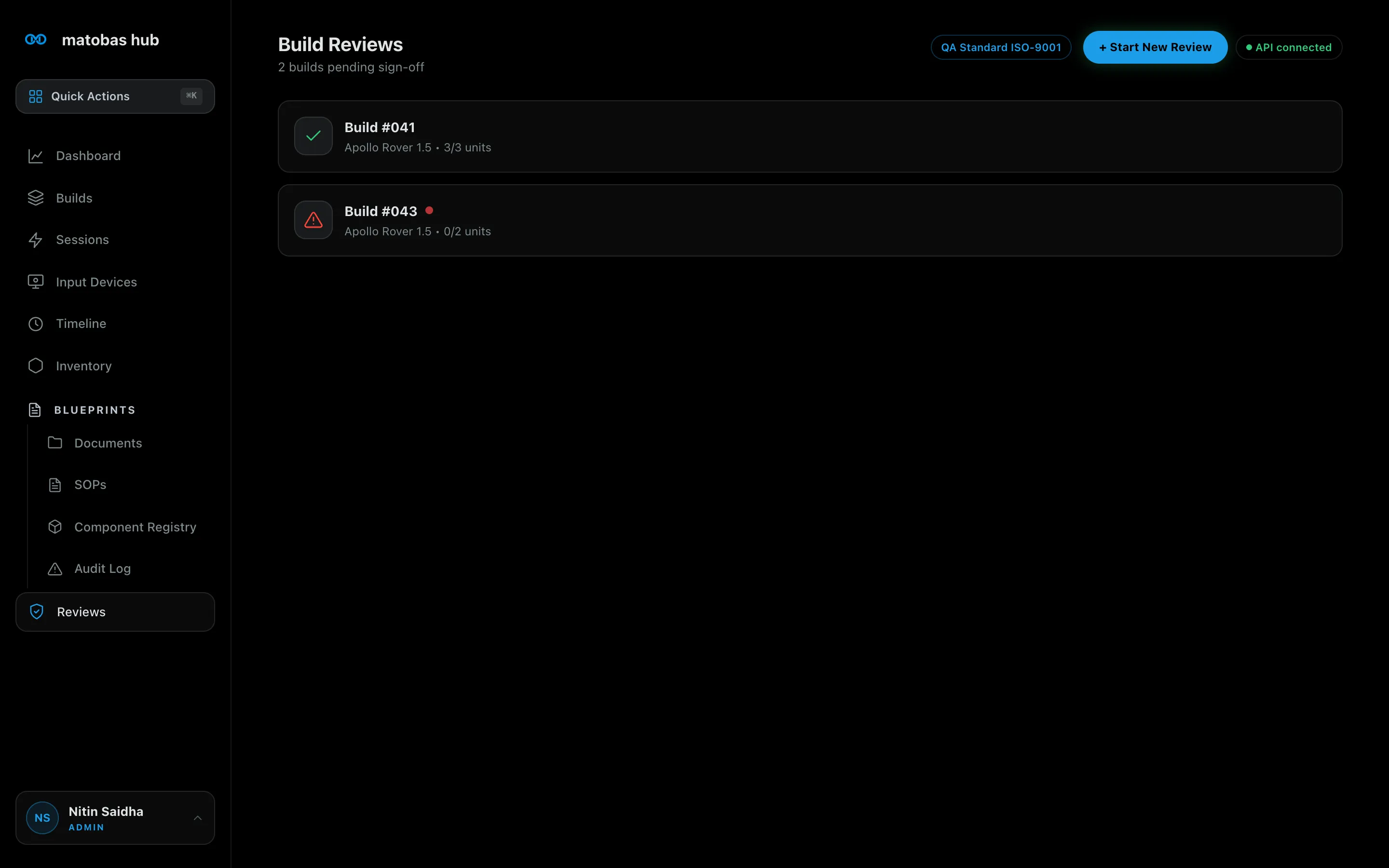
Section titled “Reviews”The sign-off gate at the end of every run. Completed and flagged builds queue here for review against your QA standard (ISO-9001 out of the box): walk the build’s steps and evidence, resolve open flags, and sign off — so a unit doesn’t ship until a named reviewer says it does, and the approval is on the record.
Input Devices
Section titled “Input Devices”Your capture fleet, managed from the browser: Oracle Modular Platform units and Iris clip-ons, with live status and one-click registration of new devices as your coverage grows.
Timeline
Section titled “Timeline”The interactive face of the ledger. Events are categorized into Actions, Inventory, and Blueprints; every event deep-links to its source — the video clip, the CAD save, the SOP change. Review happens where the work is seen, and the audit trail is simply there when you need it.
Inventory
Section titled “Inventory”Autonomous stock control with zero manual entry. Parts deduct passively from what cameras observe during builds, triangulated across Actions, Blueprints, and current stock. Every part carries a Critical / Low Stock / Healthy badge, its SKU and location, hardware and subassembly views, and a one-tap Force Reorder — with purchase drafts generated before stock runs out. Counts stay true because they’re observed, not reported.
Blueprints
Section titled “Blueprints”The design side of the house, in four parts:
- Documents — a standalone repository with type, tag, and source filters, versioning with per-document locking (concurrent uploads become contiguous versions, never lost), and “Open With” handoff: CAD and PDFs open in their native tools or the live cloud original, never a degraded in-browser render.
- SOPs — living procedures alongside CAD revisions and ECOs, each versioned and attributed. SOP text uses semantic part tokens that compile into live part descriptions with real-time stock status, so a procedure always names the exact in-stock part.
- Component Registry — a browsable catalog of your full SKU taxonomy, filterable by category, with a live SKU validator: one canonical parts vocabulary the whole team can query.
- Audit Log — a dedicated feed of drift and anomaly events — BOM Drift, Inventory Deficit, SOP Bypass, CAD Mismatch — each with severity, the expected-versus-detected part, and linked evidence. Compliance review becomes reading a feed, not reconstructing history.
Works with your stack
Section titled “Works with your stack”The Hub joins your existing tools instead of replacing them. Committed events flow out to Onshape (design variants flagged on critical alerts), NetSuite (purchase drafts below threshold), Jira (tickets for design discrepancies), and Slack (floor-ops alerts). Inbound, the Hub ingests Slack, email, meeting recordings, and CAD saves — and a Markdown export feeds the structured record into your own AI tools.
What’s next
Section titled “What’s next”The Hub’s roadmap deepens one promise: what you designed is what you built — and you can prove it.
Coming soon
- Spreadsheet on-ramp — import your existing Excel or CSV BOM with column mapping and preview-before-commit; go from spreadsheet to a versioned, buildable, floor-verified product in minutes. Export everything, always.
- History and diff — compare any two revisions of a BOM or SOP, with line lineage so a quantity change or rev bump never reads as remove-and-add.
- Releases and pinned builds — one editable draft, immutable released revisions, and every build pinned to a frozen release, so production can’t build the wrong rev.
- Lightweight change requests — draft a change, see its live impact on active builds and stock before approving, and merge it into a release with one named approval. No ECO bureaucracy.
- Lot tracking and as-built records — per-unit build records with serials, captured automatically from the step verification operators already perform. Ask “which units contain lot X?” and get an answer with evidence.
- Part pages and where-used — a page for every SKU with where-used, stock, lots, history, and documents; search any SKU or serial from anywhere.
On the horizon
- Supplier share links — revocable, read-only links to a release (BOM, SOPs, documents) for contract manufacturers, with free viewer seats.
- Shop-floor hardening — offline-queued step verification for spotty Wi-Fi and printable per-unit travelers for audits.
- Procurement — vendors, purchase orders, and lead-time-aware reorder suggestions driven by real demand from pinned builds.
- Documented API — personal access tokens and a full OpenAPI spec for the Hub’s REST surface.
- AI-verified evidence — camera-verified step completion attached directly to a unit’s as-built record, and one-click compliance packs bundling the as-built record, history, and video evidence for any unit.